
Although ESP-IDF (as well as Arduino Core) provide APIs for working with NVS (EEPROM and Preferences libraries in Arduino), there is no real EEPROM in Espressif SoCs. Instead, EEPROM is emulated in FLASH memory, and a special FLASH partition — usually named "nvs" — is used for this purpose.
ESP32 NVS is a flat key-value database with a single-level hierarchy: besides regular “key=value” pairs, each entry also belongs to a namespace. Keys can be reused if they belong to different namespaces. Throughout this document: the terms namespace, name space, NVS directory, and folder all refer to the same idea.
ESPShell lets you navigate NVS similarly to a filesystem: familiar commands such as ls, cd, rm are available. For creating and editing values you can use new and set. Import/export functionality is implemented via import and export, which save NVS to a text file that can be transferred between devices or NVS versions. The text file contains ESPShell commands that can be executed using exec or import (in fact, import is just an alias for exec).
To start the NVS editor, use the command nvs:
  esp32#>nvs
  esp32-nvs(/)>
The prompt indicates that the editor is active and you are now in the root directory. This “directory” contains only namespaces, which you can list using ls or enter with cd: think of namespaces as folders in a filesystem. To exit the NVS editor, use exit or press Ctrl+Z.
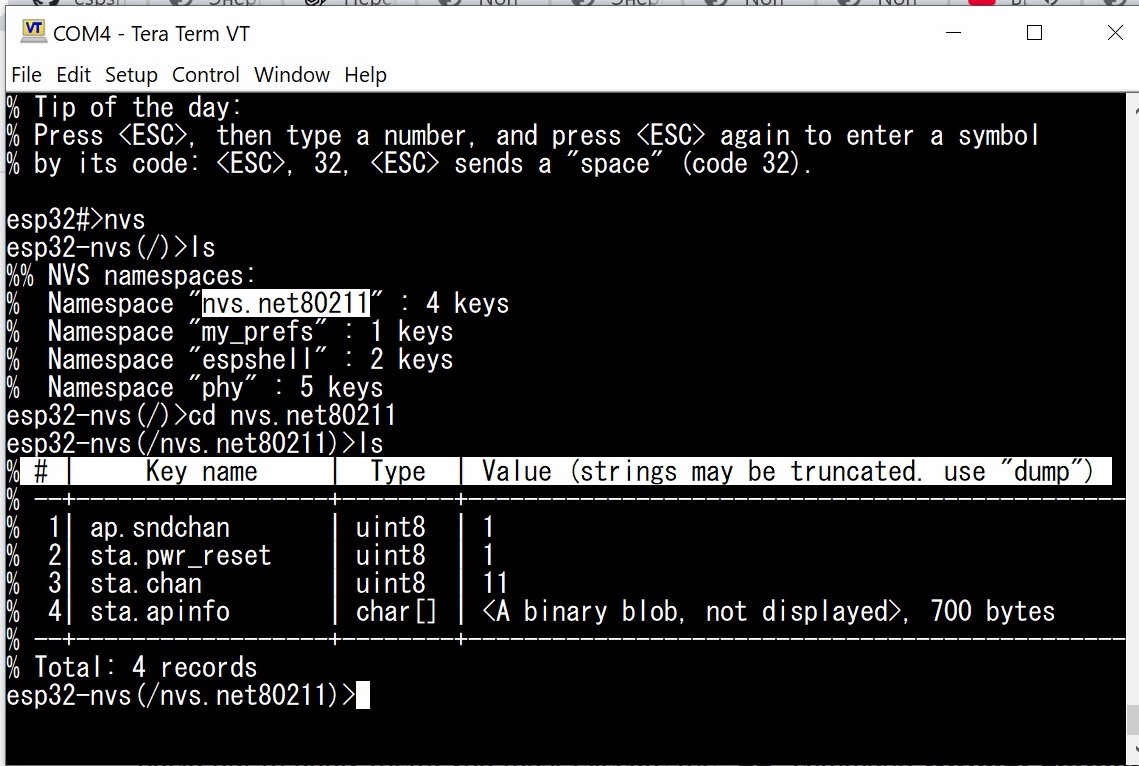
Fig. 1: Output of cd and ls commands
To view NVS data, three commands are used: cd, ls, and dump. The “dump” command is only necessary when ls is not enough: for example, ls shows only the first 42 characters of string values, and only the length and first 16 bytes of binary (blob) data.
The ls command accepts a single optional parameter — a namespace. If omitted, the namespace set by cd is used. When executed in the root directory, ls prints all namespaces:
 esp32-nvs(/)>ls
 % NVS has 3 namespaces:
 %  Namespace "espshell" : 2 keys
 %  Namespace "phy" : 4 keys
 %  Namespace "nvs.net80211" : 25 keys
 esp32-nvs(/)>
If we enter, for example, the “phy” namespace (used by the WiFi driver) using cd /phy, and then run ls, we’ll get a table of keys and their values:
  esp32-nvs(/)>cd phy
  esp32-nvs(/phy)ls
  % # |     Key name     |  Type  | Value (strings may be truncated. use "dump")
  % --+------------------+--------+-----------------------------------------------
  %  1| cal_address      | char[] | <A binary blob, not displayed>, 1 bytes
  %  2| cal_data         | char[] | <A binary blob, not displayed>, 1904 bytes
  %  3| cal_mac          | char[] | <A binary blob, not displayed>, 6 bytes
  %  4| cal_version      | uint32 | 701
  % --+------------------+--------+-----------------------------------------------
  % Total: 4 records
You can also specify the namespace directly:
esp32-nvs(/phy)>ls ../espshell
% # |     Key name     |  Type  | Value (strings may be truncated. use "dump")
% --+------------------+--------+-----------------------------------------------
%  1| tz               | char*  | UTC-07:00
%  2| hostid           | char*  | <empty>
% --+------------------+--------+-----------------------------------------------
% Total: 2 records
esp32-nvs(/phy)>
NOTE: The cd command does not require the namespace to exist. Running cd sdfgsdfg will not produce an error, and the namespace will be set to that name. When the first key is created in it, it will appear in ls /. If the namespace remains empty and you leave it (e.g. cd /), it is automatically deleted.
Since ls truncates long strings and hides blob contents entirely, the dump command is used to show full strings and to display binary data:
esp32-nvs(/phy)>dump cal_address
10 11 22 33 44 55
esp32-nvs(/phy)>
Small data (up to 16 bytes — configurable via “var tbl_min_len”) is displayed as a single line; larger blobs use formatted output:
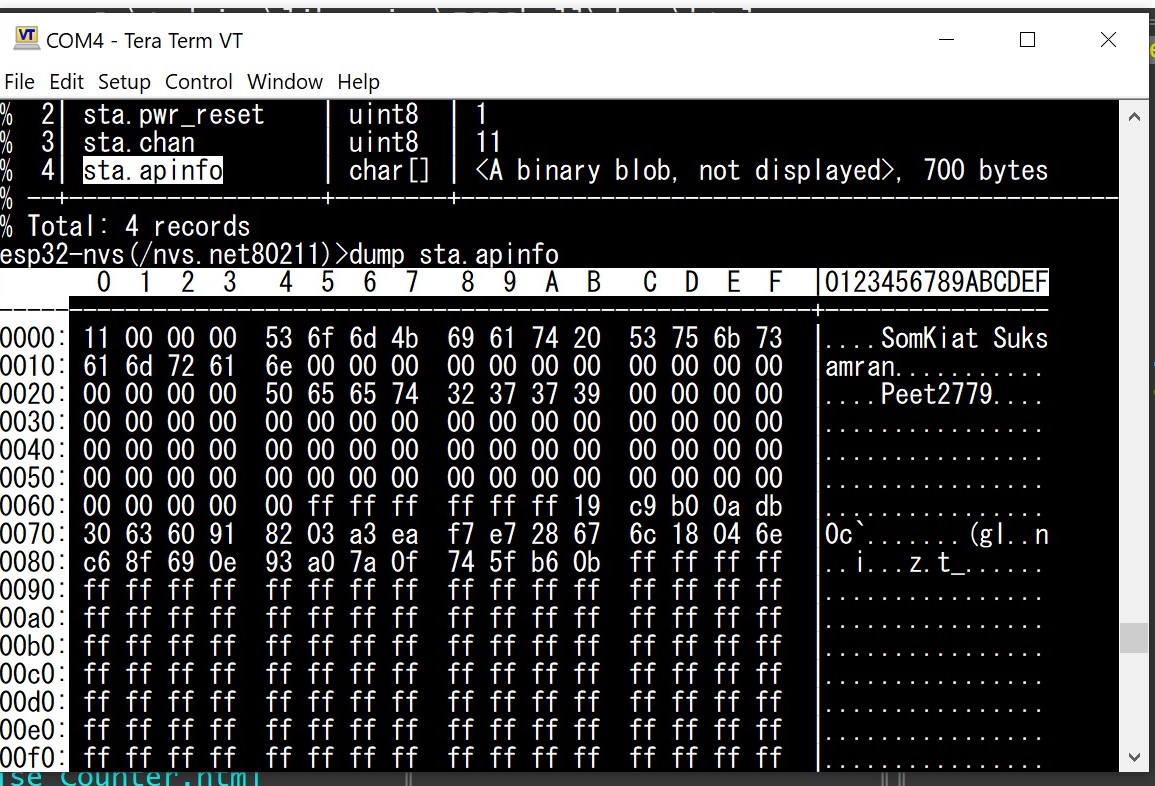
Fig. 2: Output of dump sta.apinfo command
  mars@esp32-nvs(/espshell)>dump hostid
  % "hostid" = "mars"

  mars@esp32-nvs(/espshell)>
Namespaces are entered using cd:
esp32-nvs(/)>cd espshell
esp32-nvs(/espshell)>
Relative paths are also supported:
esp32-nvs(/espshell)>cd ../phyThe root directory does not contain keys — only namespaces. NVS has only a single hierarchy level, so “directories inside directories” do not exist.
| Command | Description and examples |
|---|---|
| ls [PATH] |
List a namespace (or all namespaces if run in the root directory): esp32-nvs(/)>ls %% NVS namespaces: % Namespace "espshell" : 2 keys % Namespace "phy" : 4 keys esp32-nvs(/)> esp32-nvs(/)>ls espshell % # | Key name | Type | Value (strings may be truncated. use "dump") % --+------------------+--------+----------------------------------------------- % 1| hostid | char* |If PATH is omitted, the current namespace (set by cd) is used. |
| cd PATH |
Change the current namespace to PATH. The namespace may already exist, or may not. If it does not exist, it is created automatically. This mechanism is used when creating new namespaces: run cd first, then add keys with new. If no keys are created and you leave the namespace, it is removed. esp32-nvs(/)>cd my_prefs esp32-nvs(/my_prefs)>ls % Namespace "my_prefs" (partition: "nvs") is empty or does not exist esp32-nvs(/my_prefs)>new TestKey char % Key created. Use "set TestKey ..." to set its value esp32-nvs(/my_prefs)> |
| dump KEY_NAME |
Display the value of KEY_NAME in the current namespace. Works for strings and binary data only.
esp32-nvs(/)>cd phy esp32-nvs(/phy)>dump cal_address % f0 9e 9e 22 7b 2c |
To create a new NVS entry (key), use the new command. It creates a new record and initializes it to 0 (for scalars) or to a one-byte buffer containing 0 (for arrays).
  esp32-nvs(/)>cd phy
  esp32-nvs(/phy)>new Key unsigned char
  % Key created. Use "set Key ..." to set its value
  esp32-nvs(/phy)>new Key2 char* Hello, World!
  % Key created. Use "set Key2 ..." to set its value
  esp32-nvs(/phy)>
In this example, we created an empty key named “Key” in the “phy” namespace. The data type is unsigned char. We also created an initialized key named "Key2", which is set to "Hello, World!" after creation. The command accepts normal C/C++ type syntax. Supported types:
The rm command deletes keys. Suppose we are in the “espshell” namespace:
esp32-nvs(/)>cd espshell
esp32-nvs(/espshell)>
Running rm tz removes the key tz from this namespace. To remove all keys in the current namespace, use “*”:
esp32-nvs(/)>cd espshell
esp32-nvs(/espshell)>
esp32-nvs(/espshell)>rm *
% All keys in the namespace "espshell" were removed
esp32-nvs(/espshell)>
You can delete an entire namespace by specifying its path:
esp32-nvs(/phy)>rm ../espshellTo remove all keys everywhere, run rm * in the root (/) or execute rm / from any namespace. Deletion requires no confirmation — ESPShell will not ask “are you sure?”.
To set the value of an existing key (created earlier or via new), use set. It takes two parameters: key name and new value. Example — set the key “tz” in namespace “espshell” to “Hello World!”:
esp32-nvs(/espshell)>set tz Hello World! esp32-nvs(/espshell)>ls % # | Key name | Type | Value (strings may be truncated. use "dump") % --+------------------+--------+----------------------------------------------- % 1| hostid | char* |Binary data (char[]) uses C-style escapes: regular characters are used as-is, while% 2| tz | char* | Hello World! % --+------------------+--------+----------------------------------------------- % Total: 2 records esp32-nvs(/espshell)>
\r \n \t \v behave like C/C++, and sequences like \AB (hex digits) produce a byte 0xAB.
Example: set cal_data to bytes: 0x10, 0x20, "Hello", 0x20, 0x10:
esp32->nvs(/phy)set cal_data \10\20Hello\20\10
| Command | Description and examples |
|---|---|
| new KEY_NAME KEY_TYPE [VALUE] |
Create a key named KEY_NAME of type KEY_TYPE. KEY_TYPE may be any supported C scalar type (char, short, int, long, signed/unsigned, long long, char*, char[]). Example: create the key cal_address and assign the value 0011:2233:4455: esp32-nvs(/)>cd phy esp32-nvs(/phy)>new cal_address char[] \00\11\22\33\44\55 % Key created. Use "set cal_address ..." to set its valueNOTE: If VALUE is omitted, then an empty key is created which later can be set with the "set" command; NOTE: If VALUE is omitted and the key already exists, it is reset (strings become empty, arrays become one-byte zero arrays). |
| set KEY_NAME KEY_VALUE |
Set a new value for the key KEY_NAME. The KEY_VALUE argument is either a number (for scalar C-types) or a string/byte array. Strings and byte arrays are specified in exactly the same format. Example: change "cal_address" value to 00:11:22:33:44:55 esp32-nvs(/phy)>set cal_address \00\11\22\33\44\55 |
| rm PATH |
Delete keys or entire namespaces. The argument can be either a key name or a namespace name. |
To save the contents of NVS to a file, use the "export" command:
esp32-nvs(/nvs.net80211)>export nvs_backup.txt
% Exporting namespace "nvs.net80211"..
esp32-nvs(/nvs.net80211)>
The command can be used to export individual namespaces, or to export the entire NVS contents at once. The last argument of the command is always the name of the file to which the NVS data should be saved. The namespace can be specified explicitly, or it can be omitted. In the latter case, the current namespace will be used as the export source. The command syntax becomes clearer from the following examples:
esp32-nvs(/phy)#>export /ffat/data.txt        ← export the current namespace (i.e. "phy")
esp32-nvs(/phy)#>export ../espshell /ffat/data.txt ← export the "espshell" namespace
esp32-nvs(/phy)#>export / /ffat/data.txt     ← export the entire NVS contents
esp32#>
A previously saved NVS data file can be restored using the "import" command:
esp32-nvs(/phy)#>import /ffat/data.txt ← import data from the file into NVSWhen importing, the current directory does not matter — the import can be performed from the root directory or from any namespace (for example, "phy"); the result will be exactly the same. When exporting, the current directory only matters if the "export" command is invoked with a single argument — the file name.
| Command | Description and examples |
|---|---|
| export [NVS_PATH] FILE_PATH | Export NVS contents to a text file (the filesystem must be mounted; see "mount"). If NVS_PATH is set to "/" (the root directory), all NVS data (all namespaces) will be exported.
esp32-nvs(/espshell)>export / file.txt ← export the entire NVS contents to a file
If NVS_PATH specifies a namespace name, only that namespace will be exported.
esp32-nvs(/espshell)>export /phy file.txt ← export the contents of the "phy" namespace
If the NVS_PATH parameter is omitted, the current namespace will be exported:
esp32-nvs(/espshell)>export file.txt ← export the "espshell" namespace
|
| import FILE_PATH | Import the contents of a text file (the filesystem must be mounted; see "mount").
esp32-nvs(/espshell)>import file.txt
|
The espshell namespace contains several entries that ESPShell reads at startup. These entries affect the boot process.
Both variables are strings. The autoexec variable typically contains something like "exec /ffat/autoexec.sh" — a command that will be executed by the shell after the partitions have been automatically mounted.
The shell executes the exec command, which launches the user script — /ffat/autoexec.esh in this example.
Similarly, the automount variable contains a command string, for example "files; mount ffat /ffat ; exit". Note the semicolons: they can be used to execute multiple commands in sequence. Semicolons are supported only in this variable; in the regular CLI, a semicolon is not a command separator.
p4@esp32-nvs(📁 /)>cd espshell
p4@esp32-nvs(📁 /espshell)>ls
% # |     Key name     |  Type  | Value (strings may be truncated. use "dump")
% --+------------------+--------+-----------------------------------------------
%  1| tz               | char*  | <empty>
%  2| hostid           | char*  | p4
%  3| autoexec         | char*  | exec /ffat/autoexec.esh
%  4| automount        | char*  | files; mount tarfs; exit
% --+------------------+--------+-----------------------------------------------
% Total: 4 records
p4@esp32-nvs(📁 /espshell)>
The automount and autoexec variables are processed in the following order: the shell checks the state of the bootstrap pin. If the pin is HIGH, both commands are skipped. If the pin is LOW, the shell reads the automount variable and executes its contents as a shell command. Immediately afterward, the shell reads the autoexec variable and executes the command string it contains.